How I Passed Security+ SY0-701 with a 797: Blending Old-School Study with AI-Powered Learning

The hybrid approach: traditional foundations amplified by AI-powered precision.
The Challenge
CompTIA Security+ SY0-701 covers a massive domain: governance, attacks, architecture, operations, and program management. It's not just memorization — it's scenario-based critical thinking. I needed a study system that could handle both breadth and depth without burning out over 10+ days of sustained focus.
I needed a system that would:
- Cover breadth — hundreds of terms, frameworks, protocols
- Build depth — scenario analysis, PBQs, multi-step reasoning
- Stay engaging — sustained focus without burnout
- Target weak spots — no wasting time re-studying what I already knew
The Old-School Foundation

The foundation: textbook understanding, physical flashcards, and video courses.
The Textbook
I started with a Security+ study guide to build a conceptual framework. Reading gave me the why behind topics — understanding why NIST 800-63B exists made it easier to recall what it requires.
Physical Flashcards
Nothing beats the tactile feedback of shuffling through a stack of index cards while pacing around the house. I used these for:
- Port numbers — 22, 25, 53, 80, 443, 636, 993, 995…
- Protocol acronyms — EAP-TLS vs EAP-TTLS vs PEAP vs EAP-FAST
- Framework mappings — NIST SP 800-53, 800-61, 800-171, ISO 27001/27002/27701
The physical act of writing them out helped with initial encoding. Sorting them into "know it" and "don't know it" piles gave instant feedback.
Professor Messer + Online Courses
Professor Messer's free YouTube series was my go-to for visual/auditory learning. His explanations of complex topics (PKI certificate chains, Kerberos ticket exchange, RADIUS vs TACACS+) clicked in ways text alone couldn't.
The AI-Powered Layer
This is where things got interesting. I used AI not to replace studying, but to amplify it.

AI-generated quizzes with streak-based mastery tracking — targeting only what I hadn't locked in.
AI-Generated Custom Quizzes
The Problem: Generic practice tests include questions on topics I'd already mastered, wasting time. They couldn't target my specific weak areas.
The Solution: I used AI to generate targeted drill sets based on topics I was struggling with. After every practice test, I'd identify missed concepts and have AI create 20–50 focused questions on exactly those topics.
Examples of custom drills I built:
- Data Roles — Custodian vs Steward vs Controller vs Processor
- EAP Methods — TLS vs TTLS vs FAST vs PEAP
- NIST 800-63B — Specific password and authentication requirements
- Physical Sensors — PIR vs Microwave vs Pressure vs Ultrasonic
- Risk Calculations — ALE/ARO/SLE/EF math problems with a built-in calculator
Custom Quiz Engine
I built a full quiz engine in JavaScript that powered all my drills:
Quiz Engine Features
- Smart question selection — prioritizes questions I've gotten wrong
- Retry mode — missed questions get re-added to the deck immediately
- Mastery tracking — localStorage saves streak per question across sessions
- Results dashboard — all attempts, timestamps, scores, missed topics
- Review mode — filters to only unmastered questions for targeted reinforcement
Every minute of study time was optimized. No wasting time on questions I'd already proven I knew.
AI-Generated Study Music
This one sounds wild, but it worked. I used AI to generate songs where the chorus contained the hardest-to-remember concepts. The melody made them sticky.
Treadmill + Targeted Videos
I combined cardio with studying by watching Professor Messer videos on my weakest topics while running on the treadmill. The physical activity:
- Kept me alert (no drowsy passive watching)
- Created a different memory context (state-dependent learning)
- Prevented burnout from sitting at a desk for 6+ hours
I'd identify my 2–3 weakest topics from the day's quiz results, queue up the relevant Messer videos, and run for 30–45 minutes.
AI-Powered Score Analysis
After each practice test, I'd feed my results to AI for analysis. It would:
- Identify patterns in what I was missing
- Suggest which specific sub-topics to focus on
- Generate new questions targeting exactly those gaps
- Track my improvement trajectory over time
The 10-Day Interactive Study Plan

The 10-day sprint: foundation building, targeted drilling, and strategic rest.
This wasn't just a checklist — it was a fully interactive HTML application that served as mission control for the entire study process.
Interactive Study Plan Features
- Checkboxes for every task (state saved to localStorage — nothing lost between sessions)
- Direct links to every quiz, drill, and flashcard set — one click and you're drilling
- Daily focus labels — each day has a theme (e.g., "WEAK SPOTS · TARGETED DRILLS")
- Time estimates for every task so I could plan my day around life obligations
- Progress tracking — visual indicators of what's complete vs. remaining
| Day | Theme | Key Activities |
|---|---|---|
| 1–3 | Foundation | Courses, textbook reading, broad practice tests, first flash card creation |
| 4–5 | Drill Creation | Take full practice tests → identify missed topics → build AI-generated drills for each weak area |
| 6–7 | Targeted Attack | Run all custom drills multiple rounds, physical flashcards, video review of weakest 2–3 topics |
| 8 | Smart Review | Focus on drills with < 90% scores, run "Review Unmastered Only" mode across all quizzes |
| 9 | Light Polish | One pass through each drill (30q max), flashcard trouble cards only, rest up |
| 10 | EXAM DAY | Wake up, 15 min flashcards, one final 30q weakspot round, close the laptop, go crush it |
The plan evolved every day based on real quiz data — it wasn't static. When I discovered a new weak topic at 11 PM, I'd have a new drill created and added to the next day's schedule within minutes.
The Results Dashboard — Tracking Everything
The results dashboard: every attempt, every score, every missed question — all in one place.
Every time I completed a quiz round, results automatically saved to localStorage and appeared in a central dashboard. This wasn't a vanity metric — it was a diagnostic tool.
How I Used the Dashboard
- Sort by lowest best score → immediately see which topics need more work
- Look at the "Missed" column → see exactly which concepts within a topic are tripping me up
- Track improvement over time → if a quiz goes from 63% → 80% → 95%, the drilling is working
- Identify patterns → when the same concept appears in "Missed" across multiple attempts, that's a red flag needing focused attention
Real Example: Dashboard-Driven Decisions
Looking at my dashboard on the final night before the exam:
- Attack Types — Smart Drill: 75% (best) — lowest score, clearly needs work
- Frameworks & Processes: 76% — ports and protocol details tripping me up
- Virtualization & Security Controls: 80% — container concepts fuzzy
- NIST SP 800-63B: 80% — password policy nuances
These numbers told me exactly where to spend my final study hours. I didn't guess — the data told me.
The Iterative Weak-Topic Workflow
This is the core loop that made everything work. It's not a single event — it's a continuous feedback cycle that ran every day of my study period.
The Cycle
- TAKE QUIZ (practice app or custom drill)
- REVIEW RESULTS (dashboard shows missed items)
- IDENTIFY PATTERN (same concepts appearing repeatedly)
- GENERATE DRILL (AI creates 15–30 targeted questions)
- RUN DRILL (multiple rounds until mastery)
- VERIFY IMPROVEMENT (retake original quiz, compare scores)
- REPEAT (new weak topics surface → cycle continues)
Real Examples
EAP Methods: 35% → 90%
- Day 4: Took NAC/Proxies drill → kept mixing up PEAP vs EAP-TTLS vs EAP-FAST
- Day 4 (same night): AI generated 26-question EAP Methods drill with detailed explanations
- Day 5: First attempt 35% → drilled 4 rounds → 70% → 80% → 90%
- Day 9: Retook it: 87% first try. Locked in.
Kerberos Flow: 67% → 87%
- Day 5: Practice test missed 3 Kerberos questions — didn't know TGT vs service ticket flow
- Day 5: AI generated 28-question Kerberos drill covering full ticket exchange, Golden/Silver Ticket attacks, KRBTGT
- Day 6: 67% → 77% → 87% over three attempts
- The specific flow (AS → TGT → TGS → service ticket → app server) became automatic
Data Roles: 63% → 80%+
- Day 4: External app quiz showed I confused Data Steward vs Custodian vs Controller
- Day 5: AI generated 24-question Data Roles drill with scenario-based questions
- Day 6: 63% → 80% → mastered. The GDPR Controller/Processor distinction finally clicked.
How External App Results Fed Into Custom Drills
I used two external quiz apps alongside my custom drills:
- Flash Genius — good question structure, tracked what I missed
- Another practice app — worse question quality but useful for PBQ-style practice
After every app session, I'd note which topics I missed and cross-reference with my dashboard. If a topic showed up as weak in BOTH the app AND my custom drills, it got immediate attention.
The Mastery System
Question-Level Tracking
- Unseen → never attempted
- Missed → got wrong or streak < 2
- Mastered → 2 consecutive correct answers
The smart selection algorithm prioritizes: (1) questions never seen, (2) questions gotten wrong (worst streak first), (3) mastered questions (oldest first, to prevent decay). The "Review Unmastered Only" button ONLY serves questions with streak < 2 — laser-focus on what's still shaky.
What Worked Best: The Layered Approach
The magic wasn't in any single technique — it was in layering them:
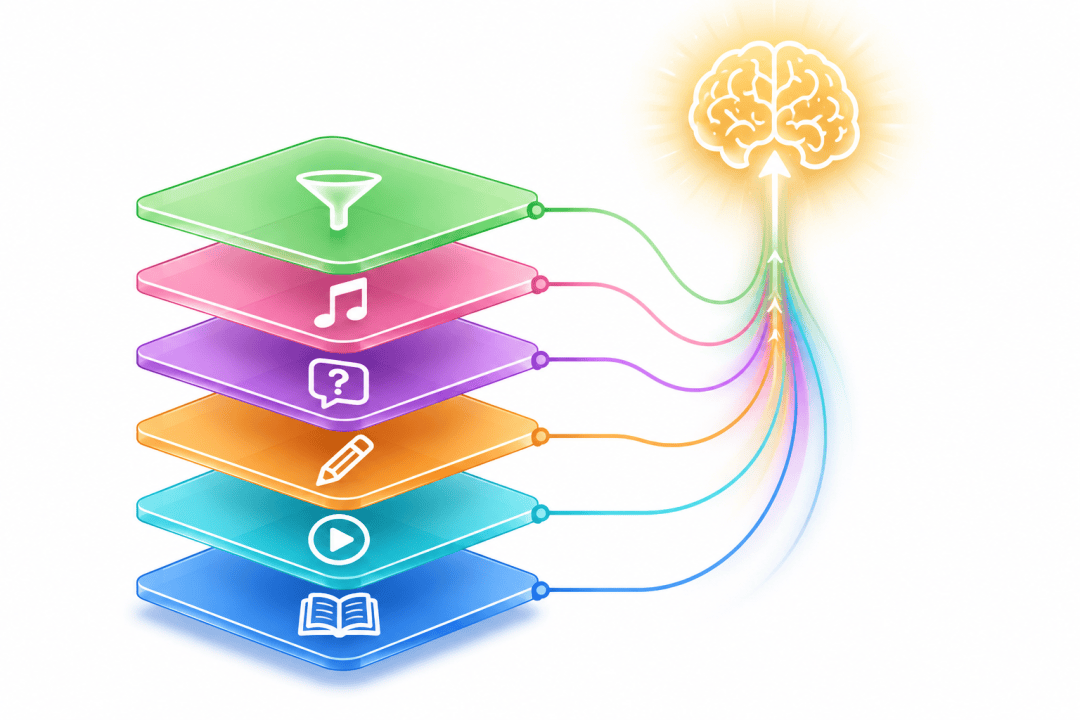
Six layers, six memory pathways: maximum retention through multi-modal reinforcement.
The Six-Layer Method
- Read the concept (textbook) → foundational understanding
- Watch it explained (Messer) → visual/auditory reinforcement
- Write it on a flashcard → kinesthetic encoding
- Drill it in AI-generated quizzes → active recall under pressure
- Listen to it in music → passive reinforcement during downtime
- Review only what's still weak → efficiency optimization
Each method targeted a different learning modality and memory pathway. By the time I'd encountered a concept through all these channels, it was locked in.
Results
- EXAM SCORE: 797/900 (PASSED) — 47 points above the 750 passing threshold
- Practice test progression: Started at ~65–75%, peaked at 100% on multiple drills in the final days
- Quiz engine stats: 73 total attempts across 31 different quizzes, 83% average score
- Mastery tracking: 400+ individual questions tracked with streak-based mastery across all drills
- Improvement curves: EAP Methods 35% → 90%. Data Roles 63% → 80%+. Policies 63% → 100%.
- Final night: Created a 112-question comprehensive weakspot drill pulling from ALL missed items across every quiz
Key Takeaways
For the Old-School Methods
- Physical flashcards are irreplaceable for rote memorization (ports, acronyms)
- Video courses work best when targeted to specific weak topics, not watched passively end-to-end
- Reading provides the conceptual "why" that makes everything else stick
For the AI-Powered Methods
- Custom quizzes beat generic practice tests because they target YOUR weak spots
- Streak-based mastery is more effective than percentage-based scoring — you need consistency, not luck
- AI is a study partner, not a shortcut — you still have to do the work, but AI makes the work more efficient
- Detailed explanations on every question turn mistakes into learning moments
General Advice
- Don't just study harder — study smarter. Know which topics you're weak on and attack them specifically.
- Mix modalities. Reading + watching + writing + active recall + physical movement = maximum retention.
- Track everything. If you can't measure it, you can't improve it.
- Rest matters. Day 9 was light for a reason. Don't cram the night before.
- Trust your preparation. By exam day, you either know it or you don't. Relax and execute.
Tools I Used
| Tool | Purpose |
|---|---|
| CompTIA study guide | Foundation knowledge |
| Professor Messer (YouTube) | Visual/auditory learning |
| Physical index cards | Rote memorization |
| Custom HTML/JS quiz engine | Targeted drilling with mastery tracking |
| AI (ChatGPT/Claude) | Question generation, score analysis, study music |
| Flash Genius app | Mobile PBQ practice |
| Practice test apps | Full-length timed simulations |
| Treadmill | Cardio + video watching combo |
| LocalStorage dashboard | Progress tracking across all quizzes |
Final Thought
The future of studying isn't choosing between traditional and AI methods — it's combining them intelligently. Use AI to identify gaps, generate targeted practice, and optimize your time. Use traditional methods for deep understanding, physical memory encoding, and the discipline of focused repetition.
You don't need to be a developer to do this. Even just asking AI to "generate 20 multiple-choice questions on [specific topic] with detailed explanations" and drilling them repeatedly is a massive upgrade over passively re-reading notes.